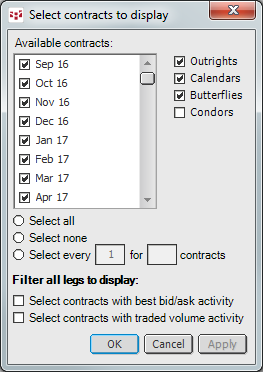
To configure months and strategies
Right-click the pyramid, then click Configure Months & Strategies.
•Select the check boxes for each month you want displayed.
•Click Select all to select the entire list of contracts.
•Click Select none to remove all contracts.
•Select every other, every third, every fourth, etc. contract for a specific period of time by clicking Select every and entering values.
•Click one of the filters to see contracts with best bid or ask activity or contracts with traded volume activity.
•Select the spread strategies to be displayed: Outrights, Calendars, Butterflies, or Condors.
To remove a column
Right-click the column you want to remove, and then click Remove [column name].
To remove a cell
You can remove individual cells from the outrights column. You cannot remove individual spread strategy cells.
Right-click the cell, and then click Remove this cell.
You are able to open a chart directly from the Spread window. Right-click the matrix and click Chart. If you have your System Settings set to open a chart when you double-click a cell, then you can also open a chart that way.
To open a trading application, right-click, then click Place an Order.