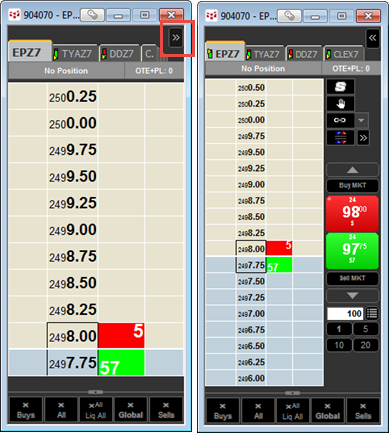
Hybrid Order Ticket (HOT) is a trading application that incorporates components of DOMTrader, Split DOMTrader, and Split Quote Board in a compact design.
You can choose to keep the display clean and simple or add additional components specific to your trading style.
In this image, the HOT on the left shows the default display. The HOT on the right shows the HOT after you click the arrow button to expose the sidebar controls.
This sidebar option is available only when controls are set to the side versus the top or bottom. The associated keyboard shortcut is F10.
Some HOT components are optional and are displayed based on the preferences you have set up. For details about optional components, see DOMTrader Display Preferences.
To change the size of HOT, drag one of the corners of the window.
By adding and moving components and sizing the window, you can customize HOT to incorporate some of the components you like best from CQG’s other trading interfaces.
Most HOT components are identical to components on other trading applications:
•Current working orders, position, and OTE
•Split market compression tool
•Buy/Sell and up/down buttons similar to SnapTrader 2
•Size field similar to Split DOMTrader and SnapTrader 2
Additionally, HOT has buy and sell market buttons. Click a market button to place a market order. If you choose to add these buttons to the display, then market orders can be placed only by using those buttons.
Related topics:
Modifying and Cancelling Orders on DOMTrader, Split DOMTrader, and HOT